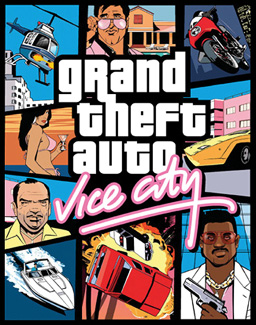
Vice City Web is an unofficial GTA Vice City browser project powered by WebAssembly. Choose Click to play above to launch the demo in a modern desktop browser. Where the full experience asks for original game files, only players who own those files should provide them.
What Is GTA Vice City Browser?
Vice City Web is a web-based way to run an open-source Vice City port on a compatible computer. It is designed for people who want to explore the technical browser version, try the available demo, or use their own original game data when the port requests it. The game code and assets load into the browser tab; there is no remote computer taking control of your session.
A GTA browser port is different from a cloud-gaming service. The page downloads the files that it needs, then your own device supplies the processing and graphics work. That approach can make launch speed and frame rate vary between computers, browsers, storage settings, and network connections.
This is an unofficial, non-commercial project based on the open-source re3 Miami port. The legal notice above explains the project status and attribution. It is not an official Rockstar Games product, store, or multiplayer service.
How to Play GTA Vice City in a Browser
Start with a current desktop browser and a stable internet connection. The browser must be allowed to use WebAssembly, WebGL, and site storage. A laptop or desktop with a keyboard and mouse offers the most practical control setup; mobile browsers may load the page, but support and controls can differ widely by device.
- Open this page in a supported browser and close applications that may be using significant graphics or memory resources.
- Select Click to play at the top of the page. The page will begin its normal first-launch download.
- Keep the tab open and active while the required resources download and cache. A first visit usually takes longer than later visits.
- Use the available demo, or confirm ownership and provide the requested original files if you choose to continue into a mode that needs them.
- Click inside the game when it loads so the browser sends keyboard and mouse input to the canvas.
To play GTA in a browser reliably, avoid private browsing when possible and make sure the browser is not set to erase site data after every session. Those settings can prevent cached resources and local saves from being kept between visits.
How GTA Vice City Runs in a Browser
WebAssembly is a browser technology that lets compiled programs run at near-native speed within a secure web page. In this project it provides the execution layer for the port, while WebGL uses the graphics capabilities exposed by the visitor’s browser. Audio, input, rendering, and local file access are therefore handled through normal browser features rather than a separately installed launcher.
When you open the game, the page first retrieves the application and resource files. The browser can cache many of those resources after the first successful load, so a later session may need less downloading. Cache behaviour is controlled by the browser and device, not by a promise of permanent storage: disk cleanup, private mode, quota limits, or clearing site data can remove it.
Because this is not a streamed video session, the game benefits from current graphics drivers, enough free memory, and an unfocused-browser policy that does not pause the tab. If the page is slow, updating the browser, freeing storage, or trying another modern desktop browser are sensible first checks.
Browser Requirements, Original Files, and Saves
Use a modern version of Chrome, Edge, Firefox, or Safari on a desktop operating system. The exact performance level depends on your hardware, available memory, browser graphics support, and whether WebGL is enabled. The launcher screen includes settings for language, fullscreen mode, cheats, and maximum frame rate; use conservative settings first if the device is older or a laptop is running on battery power.
The demo exists to let visitors try the port. It does not change the ownership requirements for original game data. If the page asks for a game file, provide it only when you own the original game and are entitled to use that file. Do not upload files that you do not have the right to use.
Local save data is kept in browser-managed site storage, commonly IndexedDB. This is convenient because a separate account is not needed for ordinary local play, but it also means clearing browser data for this site can erase saves. Export or cloud-save options, where offered by the underlying tools, are separate from the browser’s ordinary local storage.
First Launch, Downloads, and Troubleshooting
On a first visit, the progress display can remain visible while the browser receives a large collection of small game resources. This is expected while the download continues. Keep the page open, avoid switching to an aggressive battery-saving mode, and confirm that the browser has enough free storage. A refresh during an incomplete first download can restart part of the process depending on what the browser has already cached.
If the game canvas stays black after loading, first refresh once and then try the page in another current desktop browser. Check that hardware acceleration and WebGL are available, disable extensions that block scripts or storage for this site, and keep the game tab in the foreground. Errors caused by missing original data cannot be solved by changing browser settings; the port needs the requested files to be present and valid.
The project links above provide contributor and source attribution. They are included for transparency and technical reference, not as an indication of an official commercial relationship.
GTA Vice City Browser FAQ
Is this GTA Online in a browser?
No. This project is not GTA Online and it does not provide GTA Online multiplayer, accounts, matchmaking, or Rockstar-operated services. It is a single-player, browser-playable Vice City port with its own technical requirements and project attribution.
Is this an official GTA Vice City website?
No. Vice City Web is an unofficial, non-commercial project. It is based on an open-source port and is not affiliated with, endorsed by, or operated by Rockstar Games. The project should not be confused with an official game purchase, launcher, or online service.
Can I play GTA on browser without a launcher?
The web port runs from this page and does not require a separate game launcher for its browser execution. It still relies on browser capabilities, local storage, and, where requested, valid original game files. A desktop browser remains the recommended way to use it.
Why does the first GTA Vice City Browser launch take time?
The first session must download the application and resource files before the browser can run them locally. Later visits can be quicker because the browser may reuse cached files. The time varies with connection speed, browser storage, and whether a previous cache was cleared.
Do I need original GTA Vice City files?
You can use the demo available on the page. For any mode that asks for original data, you must own the original game and provide only the files you are authorized to use. The request for those files is separate from downloading the browser port itself.
Where are my saves stored?
Ordinary local saves are stored by the browser for this website, generally through IndexedDB or related site storage. Clearing browser data for the site, using private mode, or changing browsers can make those saves unavailable. Treat local browser storage as device-specific unless you deliberately use a supported export or cloud-save option.
Does the browser version work on mobile?
Mobile support is not guaranteed. Touch controls, available memory, WebGL support, and browser background behaviour vary substantially between phones and tablets. For consistent controls and troubleshooting, use a recent desktop or laptop browser with a keyboard and mouse.
What should I check if the game does not start?
Refresh the page once, keep the tab focused, and check that your browser supports WebAssembly and WebGL with hardware acceleration enabled. Then try another current desktop browser and make sure extensions are not blocking scripts, storage, or downloads. If an original file is requested, confirm that it is present and valid.